AppTune Per-App Settings: One-tap presets for Android app profiles
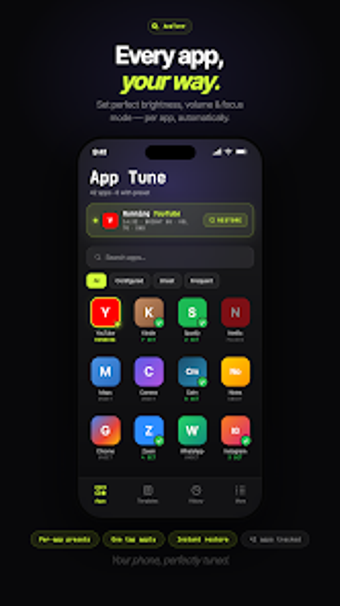
Experience coordinated app profiles with AppTune - Per-App Settings by Netheron, a utility that applies grouped system settings when launching an app. The app bundles brightness, four distinct volume streams, DND and notification blocking into customizable presets and ties them to one-tap 1x1 or 2x2 home-screen widgets. Built-in templates and multi-language support shorten setup, making it useful for Android power users, mobile gamers, and frequent readers who switch device environments repeatedly.
AppTune consolidates per-app environment controls and launches apps in one action
What it does: AppTune creates named presets that change multiple system settings and open a chosen app in a single tap. Presets can include
- screen brightness (0–100%)
- four separate volume streams (media, ring, alarm, call)
- Do Not Disturb and notification blocking
AppTune reduces continuous background activity by using a widget-first model
Moreover, the app avoids automatic background app detection and instead relies on home-screen widgets to trigger presets, which reduces ongoing system monitoring. The developer designed the workflow to sidestep invasive accessibility services, a choice that targets lower background resource consumption and less battery impact than persistent listeners or constant scanning processes.
Changes are reversible and the tool operates without root access
In addition, the app offers a persistent notification with a Revert button for instant restoration of prior system values, and the 2x2 widget includes a dedicated reset control. AppTune uses standard Android permissions rather than root, and it keeps a daily history log summarizing setting differences so users can audit recent changes.
The interface favors quick setup with templates and has clear tier limits
Nevertheless, AppTune pairs a modern dark glassmorphism theme with practical setup helpers: built-in templates, language support for eleven locales, and a compact widget-driven UX. Depth is available for power users while templates keep initial configuration short. Note that the open tier limits presets and history retention, and an expanded pro-version tier removes those caps for heavier workflows.
AppTune is a practical option for users needing quick environment switching
AppTune is a practical option for Android users who need fast, predictable changes to device settings when opening apps. A single caveat is that it relies on manual or scheduled activation rather than automatic app detection, so those wanting entirely hands-off switching must accept scheduled presets or widget taps. Tip: use the auto-scheduling feature to activate a night-reading preset during regular evening hours.